
Tutorial: a complete guard#
A guard with the whole loop: it patrols, checks out noises, chases what it sees, and when it loses you it searches where and how it lost you.
- PatrolWalks its route.
- InvestigateHeard something: walks to the noise, looks, goes back. Doesn't chase.
- "Huh?"Saw something: turns to look, a moment before it commits.
- ChaseSure of you: runs you down.
- SearchLost you: searches the cover you hid behind, or the area of a sound, or follows where you ran.
- Six parts, each ending with a checkpoint you can see in Play.
- Events write to the Blackboard; the Behavior Tree reads it. No polling.
- The clever part is the search: it branches on Get Loss Reason.
Part 1: the profile#
Create the profile as in Get Started (DA_Profile_Guard), open it and set these. Everything else keeps its default.
| Section | Setting | Value |
|---|---|---|
| Ranges | Vision Max Range | 2200 |
| Ranges | Hearing Max Range | 1800 |
| Detection | Vision Half Angle Deg | 55 |
| Detection › Cones | Enable Peripheral Cone | ticked |
| Detection › Eyes | Eye Turn Rate Deg Per Sec | 200 |
| Awareness | Suspect Threshold | 0.18 |
| Awareness | Detect Threshold | 0.40 |
| Awareness | Track Threshold | 0.65 |
| Loss | Vision Loss › Grace Time | 0.8 |
| Memory | Min Time in Lost | 8 |
| Fairness | First Spot Reaction Time | 0.4 |
| Fairness | Telegraph Threshold | 0.22 |
Why these: a grace time of 0.8 s means a thin pillar doesn't erase you at once: the guard keeps staring at where you were. Min Time in Lost at 8 makes it really search instead of shrugging and walking off. The two Fairness values make detection feel readable rather than arbitrary.
Part 2: the guard and the player#
Open your AI character Blueprint (BP_Guard) and add APS Core with Profile set to DA_Profile_Guard, as in Get Started. Tick Show Visualizer too.
Every event in this tutorial is an APS Core event: select PerceptionCore (the APS Core) in the Components list, and in Details › Events click + next to it.
On your player character, add an APS Target Component and leave it as it is: it gives the guard five points on your skeleton to look for.
Part 3: make your footsteps audible#
Hearing does nothing until something makes a sound. On purpose: the guard hears exactly what you decide is audible.
- 1
Make a sound type
In the Content Browser: right-click → Miscellaneous → Data Asset → SoundTypeDefinition → name it
DA_Sound_Footstep. Set:Setting Value Sound NameFootstep CategoryEnemy Alert LevelNormal Base Loudness1.0 Max Range900 Max LODTier1 - 2
Add a footstep notify
In your player's walk and run animations, add an anim notify named
Footstep. - 3
Emit the sound
In the player Blueprint, on that notify, call Emit Sound with Source = Self and Sound Type =
DA_Sound_Footstep.Event AnimNotify_Footstep └─► Emit Sound (Source: Self, Sound Type: DA_Sound_Footstep)
The Hearing & sounds page has everything else about sounds: walls, loudness, filters.
Part 4: push perception into the Blackboard#
The pattern: events write to the Blackboard, the Behavior Tree reads it. Never poll APS every tick from a service when an event already tells you.
4a. The Blackboard#
New Blackboard asset, BB_Guard, with these keys:
| Key | Type |
|---|---|
| TargetActor | Object (base class Actor) |
| bHasTarget | Bool |
| LastKnownPosition | Vector |
| SearchRadius | Float |
| LossReason | Enum: ELossReason |
| LossDirection | Vector |
| LastCoverActor | Object (base class Actor) |
| InvestigateLocation | Vector |
| PatrolPoint | Vector |
4b. Wire the events#
In BP_Guard's Event Graph, get the Blackboard once at Begin Play (Get Controller → cast to AIController → Get Blackboard) and promote it to a variable, BB.
Sure of you: set the target. On AI Detect fires when the guard is sure enough to act.
On AI Detect (Target, Threat Level, Stimulus)
  ├─► BB → Set Value as Object ("TargetActor", Target)
└─► BB → Set Value as Bool ("bHasTarget", true)It fires again if a chase slips back from Tracked to Detected; that just sets the same keys. Don't take the target from On Attention Changed: attention can go to someone the guard only suspects, or to a teammate.
Telegraph: the "huh?" moment. On AI Telegraph fires a moment before the guard commits.
On AI Telegraph (Target, Confidence)
  ├─► Play Sound at Location   (your "hmm?" cue)
└─► AIController → Set Focus (Target)Heard something: investigate, but don't interrupt a chase.
On AI Hear (Location, Loudness, Sound Type Name)
  └─► Branch: BB → Get Value as Bool ("bHasTarget") is false
              AND Sound Type Name is not None
True → BB → Set Value as Vector ("InvestigateLocation", Location)On AI Hear also fires between sounds while the noise builds up, with Sound Type Name None and the player's current position; the None check keeps the guard going to where the sound was.
Lost the target: stop chasing, set up the search. This is the important one.
On AI Lost (Target, Last Known, Predicted, Last Cover Actor)
  ├─ BB → Set Value as Bool   ("bHasTarget",        false)
  ├─ BB → Set Value as Vector ("LastKnownPosition", Last Known)
  ├─ BB → Set Value as Object ("LastCoverActor",    Last Cover Actor)
  ├─ BB → Set Value as Float  ("SearchRadius",      APS Core → Get Uncertainty Radius (Target))
  ├─ BB → Set Value as Enum   ("LossReason",        APS Core → Get Loss Reason (Target))
└─ BB → Set Value as Vector ("LossDirection", APS Core → Get Loss Direction (Target))Gave up: clear everything.
On AI Forget (Target)
  ├─► BB → Set Value as Bool ("bHasTarget", false)
  ├─► BB → Clear Value ("TargetActor")
  ├─► BB → Clear Value ("LastKnownPosition")
└─► AIController → Clear FocusPart 5: the Behavior Tree#
New Behavior Tree, BT_Guard, using BB_Guard. The shape:
- Root
- Selector
- bHasTarget is set CHASE
- LastKnownPosition is set SEARCH
- InvestigateLocation is set INVESTIGATE
- PATROL
- Selector
A Selector runs its children top to bottom and stops at the first that succeeds. The decorators get less specific as you go down, so the guard prioritises by itself: chase beats search, search beats investigate, investigate beats patrol.
Chase#
- bHasTarget is set · Observer Aborts: Both Sequence
- Move ToTargetActor, Acceptable Radius 150
- Wait0.5
Observer Aborts: Both matters: it lets the tree drop the chase the moment the target is lost.
Search: the part that makes it look smart#
- LastKnownPosition is set · Observer Aborts: Lower Priority Selector
- LossReason == Occluded Sequence
- Move ToLastKnownPosition
- Move ToLastCoverActor: the very thing you hid behind
- Wait2.0
- Search Steptwice
- LossReason == SoundFaded Sequence
- Move ToLastKnownPosition
- Wait3.0
- Give Upinvestigate, don't chase
- LossReason == OutOfRange Sequence
- Move ToLastKnownPosition
- Move Along Loss Direction
- Search Stepthree times
- Sequenceeverything else
- Move ToLastKnownPosition
- Search Stepthree times
- LossReason == Occluded Sequence
For the loss reason decorators use a Blackboard decorator: Key LossReason, Key Query Is Equal To, and pick the value.
Task: Search Step (BTT_SearchStep)
Event Receive Execute AI
  └─► Get Random Reachable Point in Radius
        (Origin: LastKnownPosition, Radius: SearchRadius)
  └─► AI MoveTo (that point)
        On Success → Wait 1.0 → Finish Execute
On Fail → Finish Execute // never stall the treeSearchRadius grows the longer you stay hidden, so repeating this task spirals the search outward by itself.
Task: Move Along Loss Direction
Event Receive Execute AI
  └─► Branch: LossDirection → Is Nearly Zero
        True  → Finish Execute        // you weren't moving
        False → AI MoveTo (LastKnownPosition
                           + LossDirection × 600)
→ Finish ExecuteTask: Give Up: clear LastKnownPosition and InvestigateLocation, then Finish Execute.
Investigate and patrol#
- InvestigateLocation is set · Observer Aborts: Lower Priority INVESTIGATE
- Move ToInvestigateLocation
- Wait3.0
- Give Up
- PATROLyours, or this:
- Pick Patrol PointGet Random Reachable Point in Radius around home → PatrolPoint
- Move ToPatrolPoint
- Wait2.0
Run it from the guard's AI Controller: Event On Possess → Run Behavior Tree (BT_Guard).
Part 6: watch what it's thinking#
You ticked Show Visualizer in Part 2: press Play and watch. The cones stop where its sight stops, its state and how sure it is float over its head, and the panel top right follows the guard you look at.
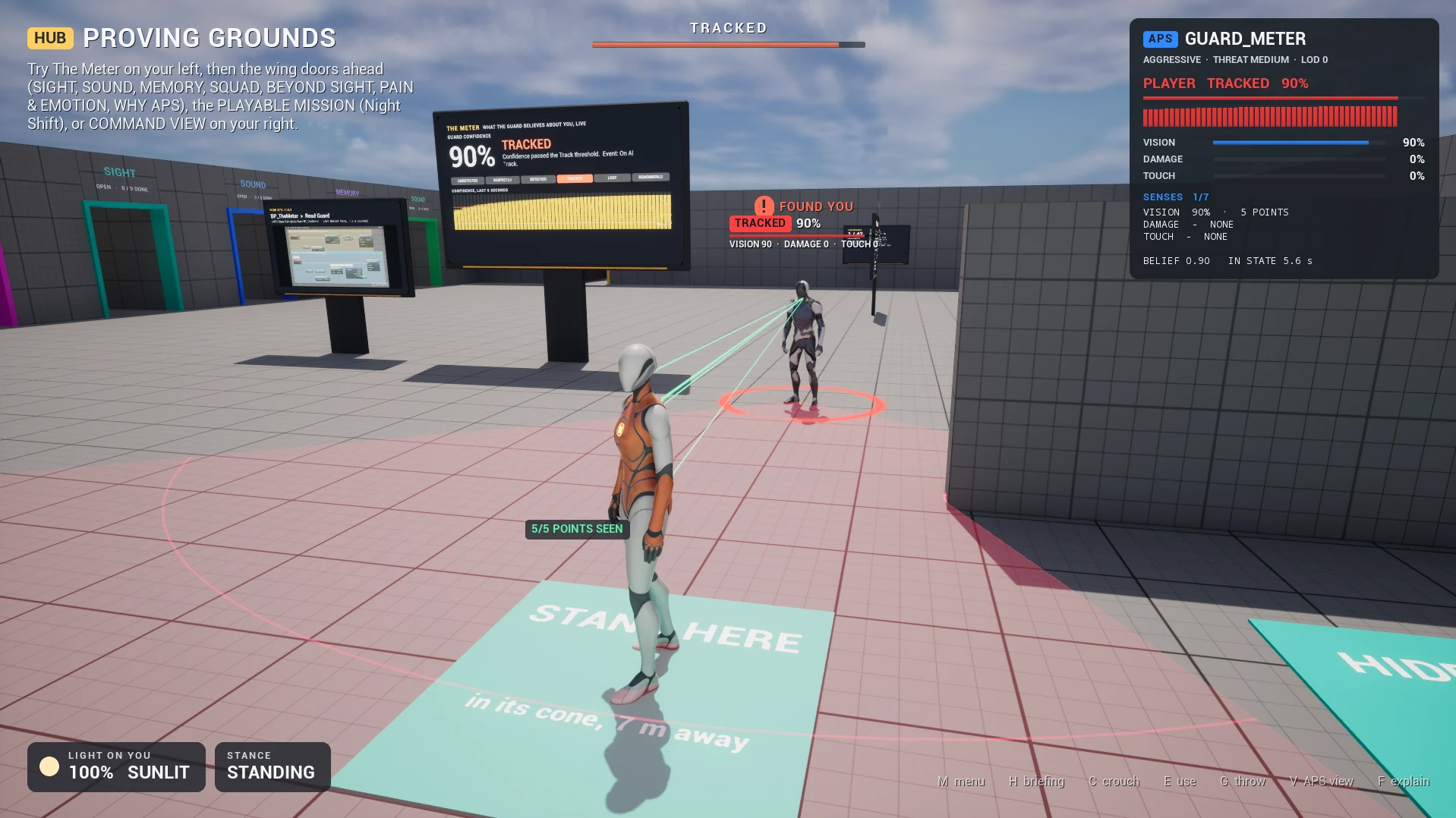
Bind keys to turn the panel's pages and to freeze perception:
Key 1 → Get Visualizer Page → + 1 → Set Visualizer Page
Key 2 → APS Core → Debug Toggle Pause| Page | Look for |
|---|---|
| Senses | Which sense drives detection, or why each silent one is silent |
| Memory | Time since sensed, how sure it still is, why it lost you |
| Brain | Threat level, how it knows, relationship, role |
| Events | Every event it fired, newest first: "is my Blueprint not bound, or did it never fire?" |
Reading the Senses page in the middle of a chase is the fastest way to understand why the guard did what it did. For the answer in words, print Explain Perception (Target: your player): it lists every sense and says why it is or isn't contributing. More in The Visualizer.
What to change next#
| Try | What happens |
|---|---|
Min Time in Lost to 20 | A far more persistent, tense guard |
Tick Keyhole Vision | You can slip past at a distance, not up close |
Add Vibration Sense with Vibration Min Speed 150 | Crouch-walking starts to matter |
A second guard, Set Squad ID on both, tick Auto Share on Detect | One spots you, both close in |
First Spot Reaction Time to 0 | Feel how much less fair it gets |
| A never-search zone around a room | A guaranteed safe space (recipe) |
Ready-made settings for other kinds of AI (a dog, a zombie, a sniper, a horror stalker) are in Ready-made AI.