Search & evidence#
Things you leave behind that an AI can find, a search that sends it where you could plausibly be, and places it will never look.
- Add APS Evidence to anything an AI should be able to find: a body, a forced lock, blood.
- An AI with APS Observer discovers it and fires On Evidence Discovered.
- APS Search hands out the best place to look next, and Is Search Exhausted says when it has looked everywhere.
Evidence#
APS Evidence turns any actor into something an AI can discover and draw a conclusion from. Add the component: that is the setup.
| Setting | Default | What it does |
|---|---|---|
Evidence Tag | Evidence | What kind of thing it is: Body, ForcedLock, Blood, Footprints |
Conspicuousness | 0.6 | How obvious it is, 0 to 1: 1 a body in a corridor, 0.2 a scuff mark. An AI has to be closer to notice the subtle ones. |
Belief Strength | 0.8 | How strongly finding it convinces the AI: the confidence of the belief it forms |
Lifetime Seconds | 0 | Fades away on its own after this long; 0 stays until removed |
Instigator | (none) | Who did it, if your game knows: carried into the finder's memory |
Implied Direction | (0, 0, 0) | Which way they went: drag marks, a blood trail, a door left swinging |
Auto Register as Perceivable | On | Register itself so AI can perceive it, with nothing else to do |
Get Age says how long it has existed ("still warm"); Remove Evidence takes it away: a body dragged off, a stain mopped up.
Implied Direction is the useful one. Most evidence says something happened here; evidence with a direction says and they went that way, which turns a sweep into a pursuit.
Discovering it#
An AI with an APS Observer component and Discover Evidence on finds evidence near it and fires On Evidence Discovered (Evidence Actor, Evidence Tag, Location), once per piece. By then the AI already holds a belief about that place. The rest is your logic: raise the alarm, start a search, change the patrol, file a memory. Get Discovered Evidence Count says how many it has found.
Search#
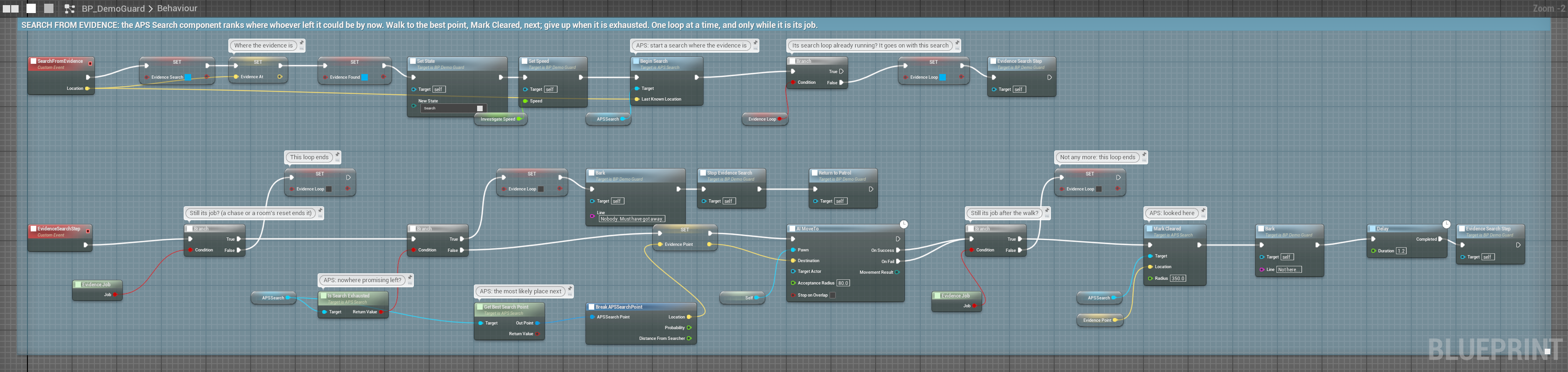
APS Search answers one question again and again: they were last seen here, and I've already looked there: where next?
On AI Lost (Target, Last Known)
  → Begin Search (Last Known)

Behavior Tree:
  → Get Best Search Point → Point
  → Move To (Point's Location)
→ Branch: Is Search Exhausted → give up, back to patrol| Node | What it does |
|---|---|
| Begin Search (Last Known Location) | Start searching around a point (replaces any search running) |
| End Search | Stop |
| Is Searching | Is one running? |
| Get Best Search Point | The single best place to look next; false when nothing is left |
| Get Ranked Search Points (Count) | The best few, most promising first: one each for a squad |
| Mark Cleared (Location, Radius) | "I've looked here": for a look through a window, or a squadmate's search |
| Is Search Exhausted | It has looked everywhere it can reach |
| Get Search Progress | How much of the reachable area is checked, 0 to 1 |
| Get Search Duration | Seconds since Begin Search |
It clears as it walks: while searching, everywhere the AI goes counts as checked (every quarter second, within Clear Radius). Call Mark Cleared yourself only for places it checked without walking there.
| Setting | Default | What it does |
|---|---|---|
Cell Size | 300 | Grid resolution in cm: smaller is more precise and costs more |
Grid Radius | 20 | Half-width of the grid in cells: 20 at 300 cm covers a 120 m square |
Target Speed | 450 | How fast the target could move, in cm/s: what turns elapsed time into an area. Set it near your player's sprint. |
Clear Radius | 450 | How close the AI must get before a place counts as checked |
Require Navigable | On | Only hand out places on the navmesh that the AI can walk to |
Go deeperHow it ranks, and the navmesh
Probability follows reachability, not distance: the most likely place isn't next to where it lost you, because you've had time to move. The peak sits at the edge of how far you could plausibly have got, and it widens as time passes.
Points respect the navmesh, so the AI never searches inside a wall:
- each point is the cell's spot on the navmesh, never a cell centre inside a wall or over a gap;
- the first time a point comes up, APS checks the AI has a full path to it; a place it can't walk to (a closed room, a roof, the far side of a wall) is skipped for the rest of the search;
- reaching a point clears its cell, even when the point sits off the cell's centre.
So every point is one an AI MoveTo can walk to, and Is Search Exhausted doesn't wait on places nobody can reach. One query path-tests at most 32 points; past that, points are handed out untested and checked on a later call, so a query never stalls a frame. With no navigation in the level (or Require Navigable off), every cell is accepted: a plain widening area.
Places it never searches#
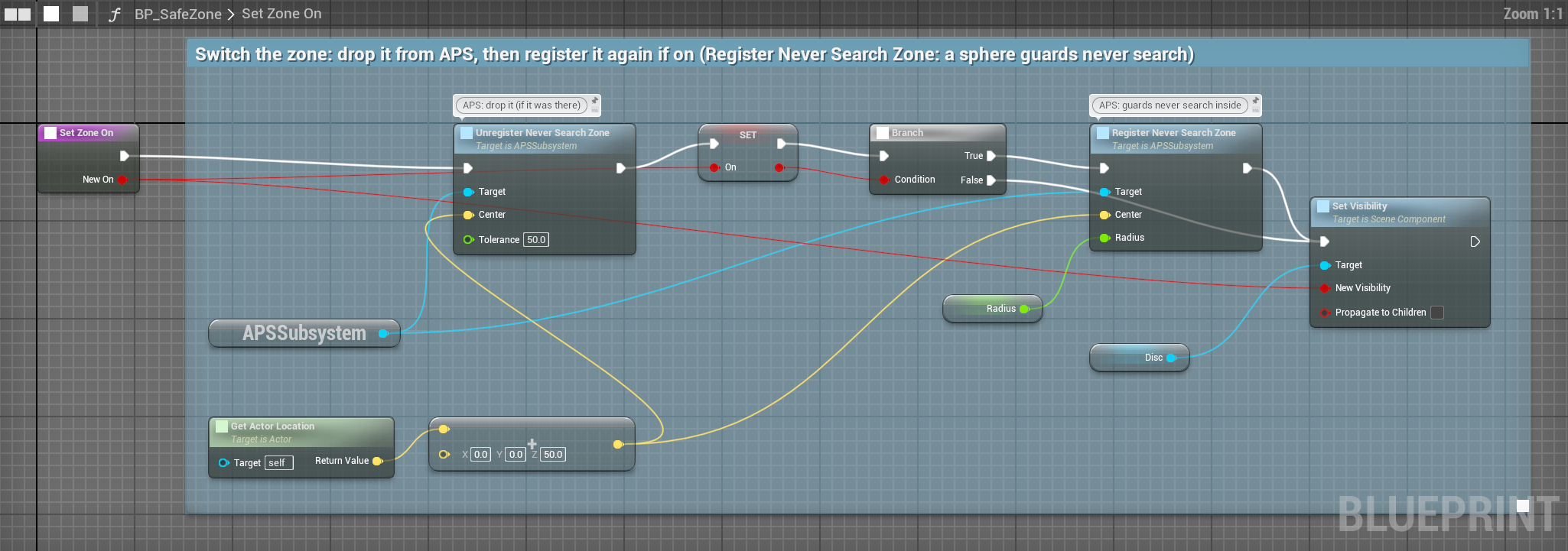
Give the player a guaranteed safe space: Register Never Search Zone (Center, Radius) on the APS subsystem marks a sphere; Unregister Never Search Zone and Clear Never Search Zones remove them.
APS doesn't enforce it by itself: your search and chase logic asks Is Location in Never Search Zone (on APS Core, which respects the profile's Respect Never Search Zones) before sending the AI somewhere, as the demo's M4 guard does.
Putting it together#
All of it your logic, with the parts APS gives you:
- The player breaks a lock and leaves. The lock has APS Evidence: tag ForcedLock,
Implied Directiondown the corridor. - A guard with an APS Observer walks past: On Evidence Discovered fires.
- Your Blueprint calls Begin Search at the lock, and Remember on a place subject so the guard finds that corridor suspicious for the rest of the session (Memory).
- The Behavior Tree runs Get Best Search Point → move, until Is Search Exhausted.
- The guard gives up; the memory of that corridor stays.