
Performance & crowds#
APS is built to run many AI at once. The costs are line traces (vision), targets (how many each AI considers) and how often it updates, and each has a direct control.
- Level of detail is automatic: AI far from every camera and doing nothing update less often, or not at all. No setup.
- The biggest single lever is
Base Update Interval(0.1 s): doubling it halves the cost. - To make an AI cheaper without touching its behaviour, give it a Quality Profile; nothing it believes is reset.
Level of detail, automatically#
Each AI is scored for significance (distance to the nearest player camera, whether it is engaged, how alert it is) and gets a tier from 0 to 4. The tier slows its updates: ×1, ×2, ×5, ×20, then suspended. An idle AI is tier 1 near you and suspended beyond about 225 m; an alerted one stays at full rate out to about 260 m. The full rule: How APS thinks.
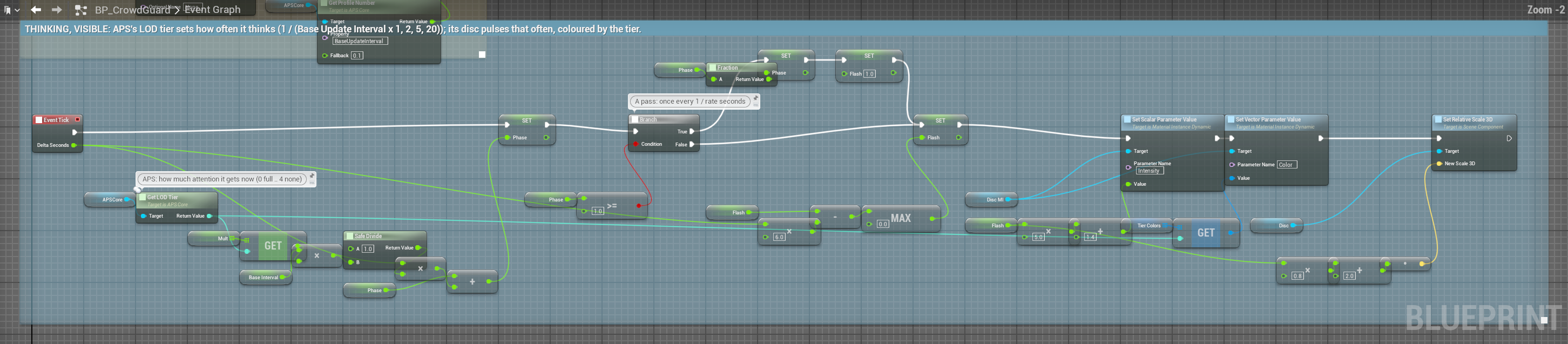
- At tier 4 nothing is perceived (unless the crowd tier is on, below), but beliefs keep fading: an AI that comes back into range has forgotten you, as it should.
- Tiers also filter sounds and stimuli: a Sound Type with
Max LODTier1 isn't even considered by an AI at tier 2 or above. Sensible tiers on your sound assets are a free, large saving. Distance Tick Throttling(on) lets tier 3 and 4 AI tick their component only every 0.1 and 0.25 s; their perception timing is unchanged.
The levers, biggest first#
1. Base Update Interval#
Base Update Interval (Performance, 0.1 s): how often perception runs.
| Value | Feel | For |
|---|---|---|
| 0.05 | Very reactive | Bosses, a single enemy |
| 0.1 | Reactive (the default) | Main combat AI |
| 0.2 | Rarely noticeable | Background AI, crowds |
| 0.5 | Clearly slow | Ambient NPCs, distant patrols |
For most AI, 0.15 to 0.2 s plays the same as 0.1.
2. Quality Profiles#
An APS Quality Profile data asset makes an AI cheaper or dearer without changing what it does. Assign it on the APS Core (Quality Profile) or call Set Quality Profile while playing: from a scalability setting, a platform, or distance.
| Setting | Default | What it does |
|---|---|---|
Update Interval Scale | 1 | Multiplies Base Update Interval |
Sense Interval Scale | 1 | Multiplies every sense's interval: thin out vision without slowing the rest |
Max Vision Samples | 0 | Caps sample points per target, whatever their source; 0 leaves them alone. It only ever lowers the count. |
Skip Per Target Light | Off | Skips the per-target light and sun-shadow trace. Changes stealth: a target in shadow reads as lit. Only for AI nobody watches closely. |
A quality change never rebuilds senses or resets beliefs, so it is safe mid-chase. That is also why it can't change Max Tracked Targets.
3. Sample points#
Sample points are traces per target per update, and they come from one of three places:
| The target has | Points used | Set by |
|---|---|---|
| An APS Target Component | Its Visibility Samples (5) | The component |
No component, but the profile has Default Visibility Samples | Those | The profile |
| Neither | Head, chest, pelvis, shoulders | Vision Sample Count (5) |
The component brings its own five points, so every AI watching your player traces five rays whatever the profile says: the most common reason a "fewer samples" optimisation shows no gain. Trim the component's Visibility Samples (head, chest and pelvis keep partial cover almost intact), or cap all three sources with a quality profile's Max Vision Samples.
5 points: full partial cover, for the player and key NPCs. 3: very good, the right choice for most. 1: true or false, like Unreal's perception, for crowds.
4. Target slots#
Max Tracked Targets (16) is how many beliefs an AI can hold; the slots are set up once, so it is memory as well as time. Single-player games rarely need more than 2 to 4; small squads 8.
5. Sense intervals#
Sense Intervals (Senses › Setup) per sense: smell changes slowly, so there is no reason to update it as often as vision. For example Vision 0.15, Hearing 0.1, Smell 0.4, Vibration 0.2, Echolocation 0.4.
6. Occlusion channels#
Every extra channel in Vision Occlusion Channels (and Pawns Block Sight) is another trace per sample point: one channel × 5 points is 5 traces, three channels × 5 is 15. Add channels only where play needs them.
7. Ranges#
Candidates are gathered within the largest of Vision Max Range, Hearing Max Range and each sense's own reach, so a 200 m hearing range makes every AI consider every Pawn in a 200 m sphere. Keep ranges honest.
Gathering is cheap: it runs at most 5 times a second and reads a grid of 15 m cells the subsystem rebuilds 5 times a second, so it doesn't grow with AI × Pawns. A range spanning more than 12 cells each way (about 180 m) falls back to the whole candidate list: still correct, no longer cheap. aps.UseSpatialIndex 0 switches the grid off, only for comparing.
Expensive on purpose#
| Feature | Cost | Worth it when |
|---|---|---|
Use Per Target Light | One more trace per target per update | Shadow is a mechanic |
Surface Vision Transmission | Traces that go through surfaces, in legs | Glass, foliage and smoke are real cover |
Pawns Block Sight, extra channels | More traces | Bodies or doors must block sight |
| 5 sample points | 5 traces per target per update | Partial cover is core to the game |
Requires Clear Path on a stimulus | A trace per AI per stimulus | Rarely: the sound system already handles walls |
Show Visualizer | About 0.3 ms a frame per AI in the editor (100 AI: about 30 ms) | Debugging a few AI. With a crowd, show it on the ones you are looking at, or aps.Visualizer 2 for status only |
Nearly free: idle AI (a distance check and out), silent senses, sound emission (far AI rejected first), unbound events, unimplemented Listener events, suspended AI.
Many AI: the level as a whole#
Significance policy#
To decide yourself who deserves the time (a boss that must never slow down, an AI in a cutscene, everything inside the current objective), make a Blueprint child of APS Significance Policy, override Score Significance (Agent, Nearest Viewer Dist, Is Engaged, Awareness) to return 0 to 1, and set it as the APS Subsystem's Significance Policy (Get APS Subsystem → set it, at Begin Play). Tiers follow your score; setting a tier directly isn't possible from Blueprint and wouldn't stick, since tiers are recomputed every pass. Get Agent Significance reads an AI's latest score.
Frame budget#
AI that start together don't update together: at Begin Play each one waits its own share of one update interval before its first pass, so a level full of guards spreads its passes over the frames instead of running them all in one.
The APS Subsystem's Max Perception Updates Per Frame (0, unlimited) caps how many AI run a full update in one frame. Those over the cap are deferred, not dropped: their time still arrives, in one larger step, so fading and timings stay correct. Slots go to the AI that are due, ranked by how overdue they are × (0.25 + significance), so even the least important waits a bounded time and is never starved. Use it when a spawn wave or a level transition spikes the frame.
The crowd tier#
At high counts, traces are the cost. The statistical tier removes them for AI far enough away, and rolls for detection instead (Performance › Crowd):
| Setting | Default | What it does |
|---|---|---|
Enable Statistical Tier | Off | Turn it on |
Statistical Tier Threshold | 3 | The tier from which an AI goes statistical |
Statistical Detection Rate | 1 | Rolls per second, scaled by the factors below |
Statistical Detection Confidence | 0.5 | The confidence a hit gives |
A statistical AI still weighs distance (within Vision Max Range), its facing (only what's in front of it), the light where it stands and how fast the target moves, as a chance per second; it updates every 4 × Base Update Interval (at least 0.25 s), even at tier 4. It never lowers an existing belief, and back at a lower tier the full senses resume.
It traces nothing, so walls don't stop it, and it stands in for sight (using Vision Max Range) even on an AI without Vision. Keep the threshold at 3 so only distant, unengaged AI take this path; at 1 almost every AI goes statistical, including those near the player.
Async vision traces#
Async Vision Traces (Performance, off) moves visibility traces off the critical path. The exposure it reports is one vision update old (about 0.15 s), so a target crossing cover fast is judged a little late. With more than one occlusion channel (including Pawns Block Sight) or any Surface Vision Transmission, APS traces synchronously anyway rather than report a wrong answer.
The profile-swap pattern#
Two profiles for one kind of AI: DA_Profile_Guard_Near (full detail) and DA_Profile_Guard_Far, a child of it with a slower interval, fewer slots... On a timer:
Every 2 seconds:
  Branch: distance to the nearest player < 5000
    True  → Set Profile (DA_Profile_Guard_Near)
False → Set Profile (DA_Profile_Guard_Far)As a child with the same senses and Max Tracked Targets, the swap keeps everything it knows (Profiles). For cost alone, Set Quality Profile (DA_Quality_Far) does the same with no risk at all.
Where to start#
| AI | Setup |
|---|---|
| 1 to 10 | Defaults everywhere |
| 10 to 30 | Base Update Interval 0.15, 3 sample points, Max Tracked Targets 8 |
| 30 to 80 | Base Update Interval 0.2, 3 points, Max Tracked Targets 4, sense intervals tuned, one occlusion channel |
| 80 to 200 | A far Quality Profile (Update Interval Scale 5, Max Vision Samples 1) switched by distance |
| 200 and more | All that, plus Enable Statistical Tier, and Max Perception Updates Per Frame against spikes |
These are rough, for a mid-range desktop: geometry dominates trace cost, so measure your own level.
Measuring#
- Show Budget on a profile estimates what it asks for (traces and updates per second for a level of AI) before you fill a level: Profiles.
stat gameandstat unitin the console: perception is in component ticks. Toggle sample counts between 5 and 1 to see the trace cost on your level.- Measure with
Show Visualizeroff: drawing what each AI thinks costs more than the thinking. - Quick test: tick
Pause Perceptionon every AI. If the frame time doesn't improve, APS isn't your bottleneck.
Memory is small: belief slots are set up once (no allocation while perceiving), one object per sense per AI, five episodes per target, one small player model per observed target. An AI with 8 senses and 16 slots is a few kilobytes: AI count is a CPU question, not a memory one.