
The senses#
Eight senses, and each AI picks the ones it has. A guard, a guard dog and a blind cave creature are three profiles, not three pieces of code.
- Pick an AI's senses in its profile's Sense Classes. A new profile has Vision Sense and Hearing Sense.
- Most senses are automatic. Hearing needs your game to make sounds; Pain needs you to report it.
- Every sense gives its own confidence; the strongest sets the level and the others add.
The eight senses#
| Sense | Perceives | Needs you to | Walls? | Demo |
|---|---|---|---|---|
| Vision Sense | What it can see, how much of it, how lit | Nothing | Blocked | Sight wing: Confidence |
| Hearing Sense | Sounds your game makes | Call Emit Sound | Each wall muffles | Sound wing: Hearing & sounds |
| Smell Sense | Scent, carried by the wind | Nothing | Each wall weakens it | B1 |
| Vibration Sense | Footsteps through the floor | Nothing | Passes through | B2 |
| Echolocation Sense | Anything within its pulse | Nothing | Passes through | B3 |
| Touch Sense | Whatever bumps into it | Nothing (it wires itself) | Contact only | B4 |
| Damage Sense | Whoever hurt it | Nothing (it wires itself) | Any distance | D1 |
| Pain Sense | Its own pain: dulls its other senses | Call Report Pain from Definition | Inside itself | D2: Emotions & pain |
Choosing an AI's senses#
Open the profile → Senses › Setup → Sense Classes, and add or remove senses. The order is the slot number; an AI uses at most 8.
- Sense Weights: a multiplier per sense (anything not listed is 1). A guard dog might weigh Smell 1.5, Hearing 1.2, Vision 0.6.
- Sense Intervals: seconds between a sense's evaluations, per sense (anything not listed uses the sense's own default: Vision 0.15 s, Hearing 0.1 s, Smell 0.25 s, Echolocation 0.3 s). Slowing an expensive sense is the cheapest performance win there is: vision at 0.3 s on background AI is usually indistinguishable from 0.15 s.
| A kind of AI | Senses | Weights |
|---|---|---|
| Stealth guard | Vision, Hearing | 1, 1 |
| Guard dog | Smell, Hearing, Vision | Smell 1.5, Hearing 1.2, Vision 0.6 |
| Zombie | Hearing, Vibration, Vision, Touch | Hearing 1.4, Vibration 1.3, Vision 0.4 |
| Blind creature | Echolocation, Hearing, Vibration | Echolocation 1.2, the rest 1 |
| Turret or camera | Vision, Damage | Vision 1 |
| Soldier | Vision, Hearing, Damage, Pain | 1, 1 |
Copy-paste settings for each are in Ready-made AI.
Go deeperChanging one sense's own settings
Most tuning is on the profile (ranges, angles, thresholds, loss). Smell Sense and Touch Sense also have a few settings of their own. Because Sense Classes holds classes, those come from the class defaults. To change them:
- Content Browser → right-click → Blueprint Class → search the sense (for example Smell Sense) and pick it as the parent.
- Name it, for example
BP_Sense_Smell_Bloodhound, open it and change the values in Class Defaults. - Put your Blueprint in Sense Classes instead of the original.
That is also how two kinds of AI can share one profile but differ in one sense. Every sense's own settings are listed in Components & assets.
Vision#
Automatic. If you're in range, in a cone, lit enough and not hidden, confidence rises. The Confidence page shows each factor in the demo; the rest of vision is here.
What it checks, in order#
- CamouflageA Visibility Multiplier of 0 on the target's APS Target Component stops here, before any trace.
- RangeDistance falloff.
- ConesFocal, then peripheral, then rear. Outside all three: nothing.
- How much showsTraces to the target's points: exposure, 0 to 1.
- StanceEnough points visible for this stance?
- LightGlobal, or measured at the target.
- MotionA faster target is easier to spot.
Cones, and keyhole vision#
| Cone | Settings (defaults) | What it does |
|---|---|---|
| Focal | Vision Half Angle Deg (60) | The main cone: full strength at its centre, fading to zero at its edge. |
| Peripheral | Enable Peripheral Cone (off), Peripheral Half Angle Deg (110), Peripheral Confidence Scale (0.45), Peripheral Range Scale (0.6) | Wider, weaker, shorter: catches movement at the edge of sight. It takes over where the focal cone ends. |
| Rear Motion | Enable Rear Motion Cone (off), Rear Motion Half Angle Deg (60, from directly behind), Rear Motion Min Speed (300), Rear Motion Confidence Scale (0.25), Rear Motion Range Scale (0.35) | Only targets moving faster than the min speed. Stops a player strolling up behind a guard, without making it see everything. |
Use Separate Vertical FOV gives the cone its own pitch angle (Vision Vertical Half Angle Deg, 40): elliptical instead of round, for games with a lot of verticality.
Keyhole Vision (Keyhole Vision) makes the cone wide up close and narrow far away: Keyhole Near Angle (90) inside Keyhole Near Distance (400 cm), narrowing to Keyhole Far Angle (15) at full range. You can slip past a guard at 20 m by staying a little off its centre line; at 3 m it catches you in a wide arc. It reads far more naturally than a fixed cone.
Eyes in the head#
Unreal's own perception aims from the actor's root and faces its control rotation, which has nothing to do with the mesh: head turns and lean animations never move it, and the cone snaps to a Move To target before the body has turned. Detection › Eyes fixes both:
| Setting | What it does |
|---|---|
Use Eye Socket | Take the eyes' position from a mesh socket instead of Eye Height Offset (64 cm) |
Eye Socket Name | Usually head |
Eye Direction Mode | Where the facing comes from: Actor Rotation (default, cheapest), Control Rotation (Unreal's way), Socket Rotation (head bone) or Blended (actor + socket) |
Eye Socket Alignment | How the socket's rotation becomes a direction: leave it on Automatic |
Eye Socket Rotation Weight | Blended only: 0 all actor, 1 all socket |
Eye Turn Rate Deg Per Sec | How fast the facing may turn (0 = instantly). Set it near your mesh's real turn rate, so the AI can't see you before it has turned to look. |
To use the eyes yourself (aim a flashlight, check what the AI could see), call Get Eye View Point: their live location, and the facing after Eye Turn Rate Deg Per Sec.
What blocks sight#
| Setting | What it does |
|---|---|
Vision Occlusion Channels | Which collision channels block sight. Empty means Visibility only. Unreal's perception tests one channel, which is why AI so often sees through doors and vehicles. |
Pawns Block Sight | Other perceivable actors block sight too: bodies hide you |
Surface Vision Transmission | A physical surface → how much sight passes through it (0 to 1): glass 1, foliage or smoke 0.4, solid 0. Surfaces not listed block completely. |
Only things that block count: a trigger volume that only overlaps never hides you, unless its surface is listed in Surface Vision Transmission.
Light#
| Setting | What it does |
|---|---|
Darkness Min Detection | How much it still sees in total darkness (0.1; 0 means blind in the dark) |
Use Per Target Light | Measure light at the target instead of one global value. Without it a dark corner is as bright as daylight. |
Trace Sun Shadow | With the above: trace from the target toward the sun to see if it's in shadow (on by default). Needs Set Sun Direction on the APS subsystem. |
Shadow Light Level | Light level in shadow (0.25) |
Sun Trace Distance | How far that trace reaches (5000) |
The light on a target is the first of:
- its APS Target Component
Light Level Override, when it is 0 or more. This wins whatever the profile says, so a light gem works even withUse Per Target Lightoff; - with
Use Per Target Lighton, the sun-shadow trace (shadow can only darken, never brighten); - the global light.
Go deeperPoints on the target, and exposure
Where the points come from, first match wins:
- The target's APS Target Component
Visibility Samples: 5 by default (head 1.0, chest 0.9, pelvis 0.7, left and right clavicle 0.6). Read from mesh sockets each evaluation, so they follow animation: leaning out of cover really exposes your head. A socket that doesn't exist falls back to its offset instead of being dropped. - The observer profile's
Default Visibility Samples, if you filled it in. - A built-in head, chest, pelvis and shoulders set, limited by
Vision Sample Count.
Vision Sample Count only limits the third. To trace less on targets that have a Target Component, remove entries from its Visibility Samples; a Quality Profile's Max Vision Samples caps all three.
Min Exposure to Register: the least weighted exposure before the target registers at all (0: any).Min Visible Points Standing,Min Visible Points Crouched,Min Visible Points Prone: how many points must be visible per stance. All 1 by default, so adding a Target Component never makes anyone harder to see; set 2 crouched and 3 prone for stance-aware stealth.- A point counts toward the stance rule only when more than half of sight reaches it. Behind heavy foliage it still adds to exposure, but isn't "visible".
Exposure is smoothed so standing on the edge of cover doesn't flicker, but it snaps at once when it hits zero, or when it jumps by more than 0.4: ducking fully behind a wall counts immediately, and so does stepping into the open.
Losing you: grace 0.3 s, direct cut, decays 3 times as fast. Its loss reason comes from what blocked its last look: Occluded, OutOfRange or SensorDropout (see Why it lost you).
Hearing#
Only hears what your game emits: there's no hearing from velocity. Call Emit Sound (from an actor) or Emit Sound at Location (from a place), with a Sound Type Definition that says how loud it is and how far it carries. Walls muffle, repeated noises add up, and a noise with no maker becomes a belief about a place. Everything is on its own page: Hearing & sounds.
Smell#
Automatic while in range, and indifferent to light: it works in total darkness. It reports where you are, but marked as imprecise (0.15 to 0.4), so any more precise sense wins the last known position.
The wind is the mechanic. When the wind carries your scent to the AI (it is downwind of you) it smells you up to twice as strongly (Downwind Bonus, 2). When the wind blows from it toward you, its signal drops to a tenth: keep the wind in your face and you can walk right up to it.
- Where the wind comes from: Set Wind State on the APS subsystem (direction and speed), or an APS Environment volume that overrides the wind. Indoors there is no wind. To give one kind of AI its own wind, set
Wind Directionon a Blueprint child of Smell Sense: when it isn't zero, it wins. - The world changes it: indoors scent is 1.2 times stronger; outdoors it weakens as the wind gets stronger, down to a quarter at 800 cm/s.
- Scent tags: On AI Smell gives a
Scent Tag: the first actor tag on the target that starts with theScent.prefix. Tag your playerScent.Human, a deerScent.Prey, a bodyScent.Blood, and branch on it.
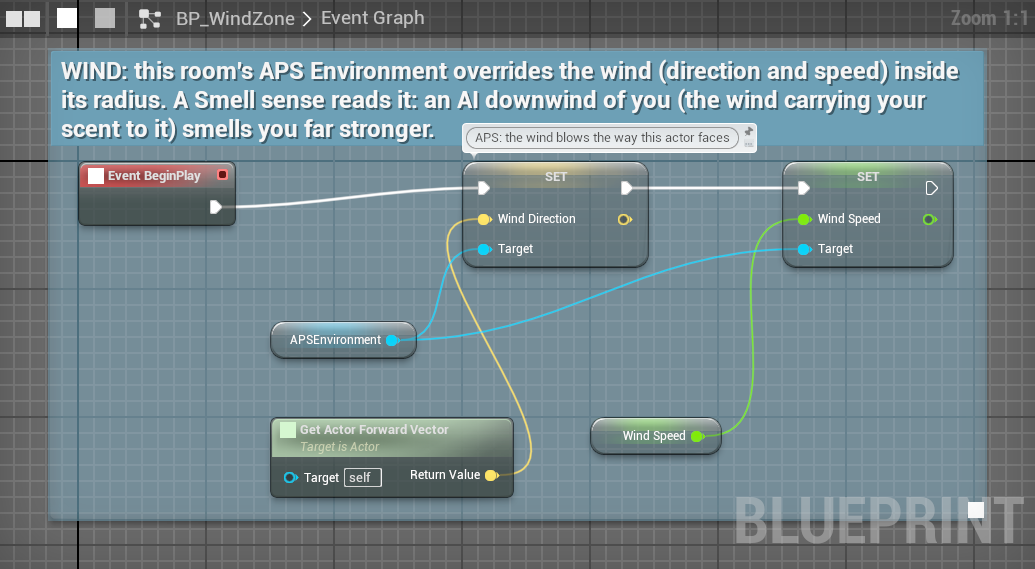
Range and build-up come from the profile when set: Smell Max Range (400), Smell Accumulation Rate (0.1), Smell Decay Rate (0.05). The build-up only grows while you are in range, and fades only once you are out of it.
Go deeperThe smell formula, and its own settings
Confidence = max(instant, built up)
instant    = (Base Scent Intensity / Scent Threshold) × (1 − distance / range)
           × wind × exp(−Wall Absorption Coeff × walls) × weather × environment
wind = Lerp(0.1, Downwind Bonus, (dot + 1) / 2) (dot: the wind against target-to-AI)With the defaults (intensity 1, threshold 0.4) it starts at 2.5, so scent reaches full confidence well before point-blank range. Lower Scent Threshold makes it more sensitive. The settings below are the sense's own (change them on a Blueprint child):
| Setting | Default | Meaning |
|---|---|---|
Max Smell Range | 400 | Range when the profile's Smell Max Range is 0 |
Wind Direction | (0, 0, 0) | The way the air moves: (1, 0, 0) carries scent toward +X. Zero uses the world's wind. |
Downwind Bonus | 2 | Multiplier straight downwind |
Base Scent Intensity | 1 | How strongly targets smell |
Scent Threshold | 0.4 | Divides the intensity: lower is more sensitive |
Wall Absorption Coeff | 0.25 | Per wall: lower than hearing's, scent seeps under doors |
Losing you: grace 20 s, no direct cut, decays slowly (×0.3), loss reason ScentLost. Scent lingers long after you've gone.
Vibration#
Footsteps through the floor. Passes through walls; no line of sight. The main sense for zombies, burrowing creatures and blind bosses (the clip at the top of this page).
Anything moving faster than Vibration Min Speed (10 cm/s) within Vibration Detect Range (800 cm) makes a signal: (1 − distance / range) × clamp(speed / 600, 0, 1). How fast you move matters more than how close you are: at 150 cm/s you make a quarter of the signal you make at 600.
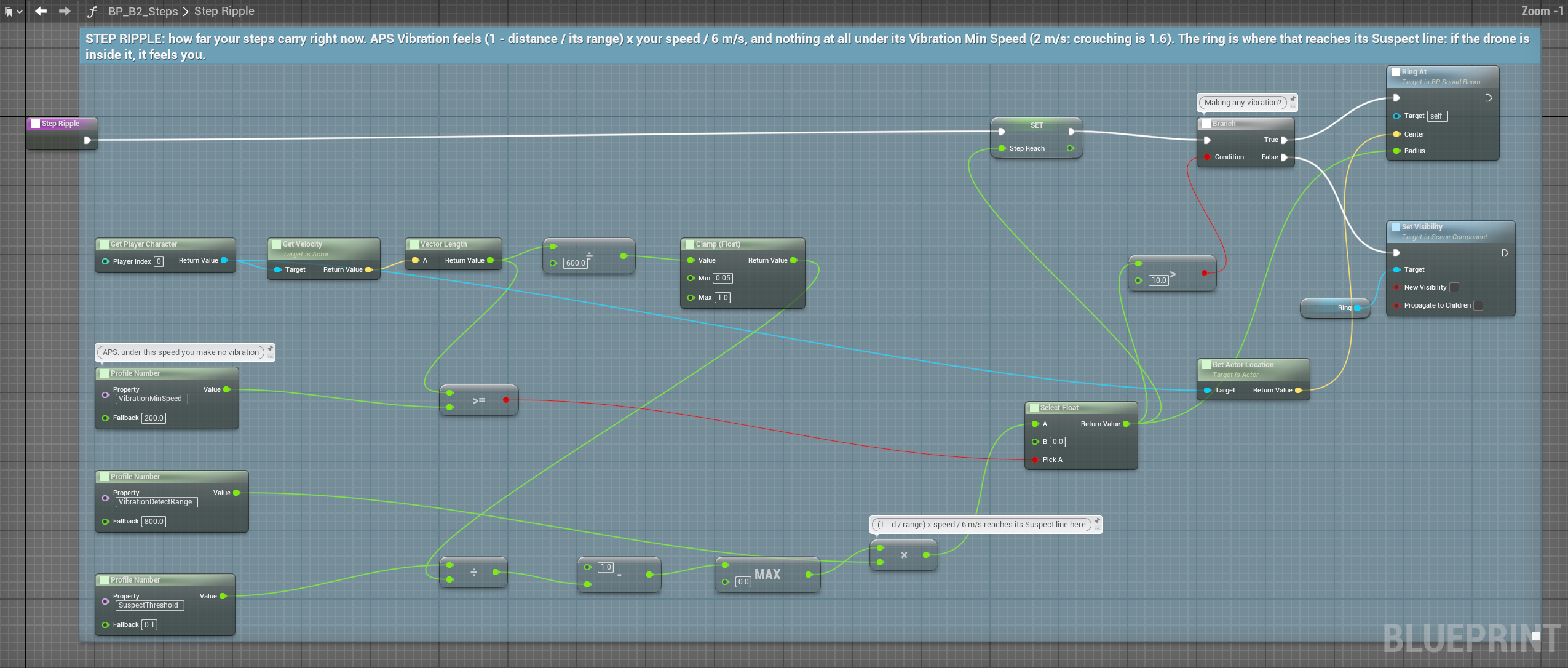
- Surfaces: the target's actor tags
Surface.Metal,Surface.WaterorSurface.Groundsay what it's walking on; On AI Sense Vibration passes it on. - Things that aren't someone walking (a grenade, a collapsing wall): call Report Vibration Event (location, strength, surface). The AI feels it at that place (a place belief tagged Vibration, and On AI Sense Vibration), never as evidence about whoever stands nearby.
- Explosions shake the ground: vibration also feels sounds whose
Sound NameisExplosion, from Emit Sound and Emit Sound at Location alike.
Losing you: grace 0 s, decays fast (×5), loss reason SensorDropout. Stand still and a vibration hunter loses you at once.
Echolocation#
Pulses that need no light and no line of sight. For bats, aliens, blind bosses and sonar robots. Anything within Echo Range (1500 cm) returns the pulse, every 0.3 s.
Confidence = (1 − distance / range)²: precise up close and dropping hard; at half range it is only 0.25. Echo Directional limits it to the front, loosely: it ignores targets more than about 101° off its facing (the same facing vision uses). Echolocation fires On AI See: to the AI, it is sight.
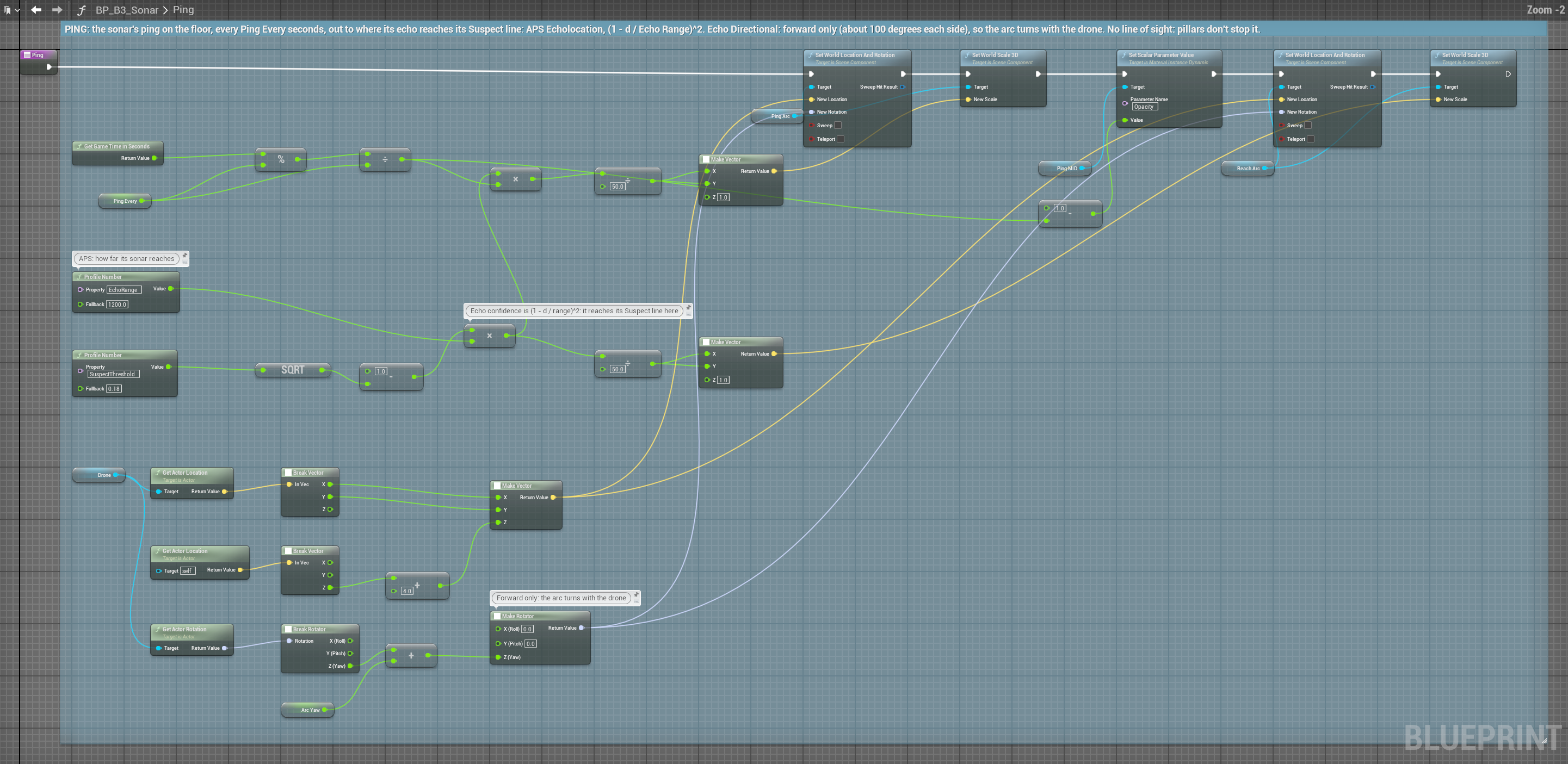
Losing you: grace 0.6 s, direct cut, loss reason OutOfRange.
Touch#
Contact: instant, and exact. Touch always places you with full precision (vision does only while all of you shows).
It wires itself: with Touch Sense in the profile and Auto Wire Touch Events on (the default), APS listens to the AI's own hits and overlaps.
- A character walking into the AI is felt as a Bump, stronger the faster it was moving: no physics settings needed.
- Only an AI whose root is physics-simulated needs
Simulation Generates Hit Events; APS warns in the log if it's off. Auto Wire Overlap as Grabtreats overlaps as a held Grab.- A contact belongs to whoever made it, or whoever threw, fired or carries the thing that did. The AI bumping into a wall belongs to nobody.
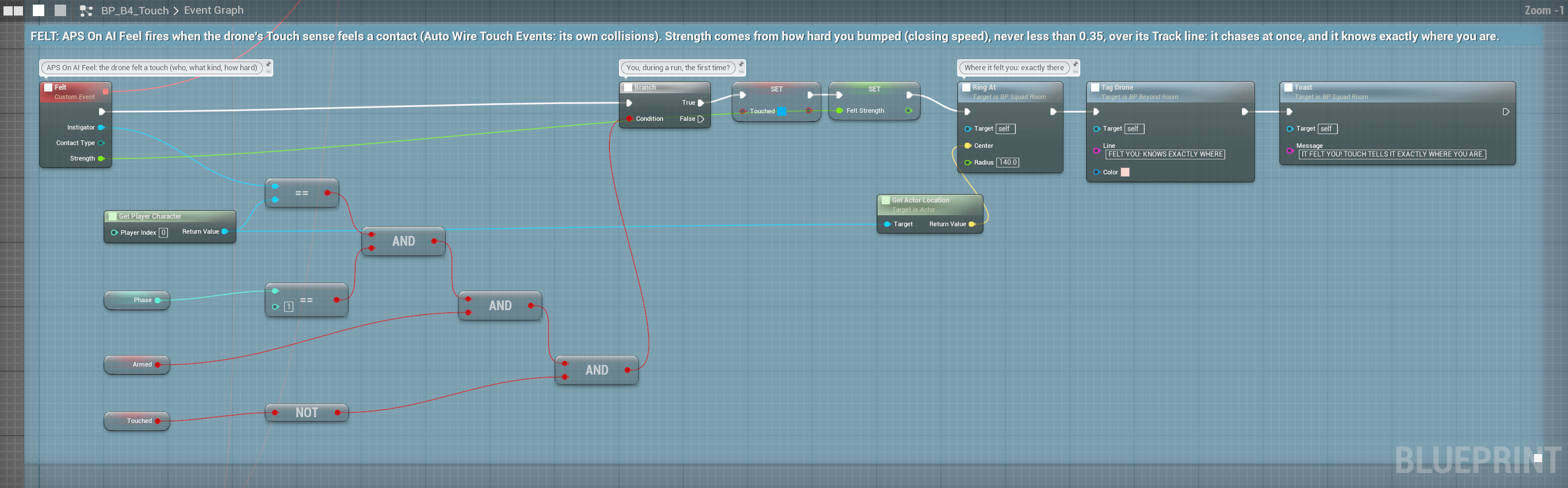
Or report contacts yourself: Report Touch Contact (instigator, type, strength, persistent, location), Report Touch Contact with Impulse (from a physics hit: the impulse sets the strength), End Touch Contact (ends a held one). Contact types rank Explosion > Grab > Collision > Bump: when several land in one tick, the highest sets the confidence.
A held contact (a grab, an ongoing overlap) keeps building: strength + min(seconds held × Touch Persistent Accumulation Rate, Touch Max Persistent Bonus) (0.3 a second, up to 0.5).
Losing you: grace 0.5 s, decays ×2, loss reason SensorDropout.
Damage#
Whoever hurt it, at any distance. Add Damage Sense and every Unreal damage call (Apply Damage, Apply Point Damage, Apply Radial Damage) reaches it, no setup. Even a sniper 200 m away becomes a target the moment the shot lands, and the AI places the shooter almost exactly.
Auto Confidence from Damageon (the default): confidence in the attacker rises to all the damage taken from them so far ÷ 100. 100 damage in one hit is instant full detection. If your rifle does 25, one shot is 0.25: enough for Suspected, not Detected; the second makes 0.5, Detected.- Off: damage only fires On AI Damaged (instigator, amount, damage type tag, hit location), and you decide, for example with Set Target Confidence.
The Emotions & pain page shows the demo's D1 room: a thrown can tells the guard exactly where you stood.
Losing you: grace 8 s, decays slowly (×0.5). An AI remembers being shot.
Pain#
Pain is not health: it dulls the AI's senses. A flashbang leaves a guard near-blind for a few seconds; fire distracts its hearing. You create one Pain Type Definition per kind of pain (which senses it dulls, how fast it fades) and report it with Report Pain from Definition. Low health, read automatically from your character, dulls every sense too. All of it is on Emotions & pain.
APS and Unreal's AI Perception#
| Unreal AI Perception | APS | |
|---|---|---|
| Senses | Sight, hearing, damage, touch, team, prediction | 8, and you can add your own |
| Combining them | Each reported on its own | One belief: the strongest sense plus agreement |
| Hearing | Noise events | Sound types, loudness, filters, walls that muffle, build-up |
| Sight's origin | Actor plus eye height, facing the control rotation | A head socket, facing where the head looks, turning at a real rate |
| Smell, vibration, sonar, pain | None | Built in |