
Emotions & pain#
An AI that gets shot knows who did it. A flashbang leaves it blind but still listening. And it gets angry, afraid or curious according to what it perceives.
- Damage Sense: any Unreal damage tells the AI who hurt it, at any range. No setup.
- Pain Sense: pain you report dulls chosen senses for a while (a flashbang: blind, still hearing). Low health dulls every sense.
- Emotions: fear, aggression, curiosity, alertness and panic rise and fall with what it perceives. Read the dominant emotion to choose a behaviour.
Damage, pain and emotion are three separate systems. None of them manages health: your health system stays yours.
Damage: knowing who hurt it#
Setup#
Add Damage Sense to the profile's Sense Classes. That is all: when play begins, APS hooks every Unreal damage call on the AI's pawn: Apply Damage, Apply Point Damage and Apply Radial Damage. Each hit counts once (Unreal reports a point or radial hit twice; APS counts it once), and several hits in one frame, such as every pellet of a shotgun, all count.
On AI Damaged (Instigator, Amount, Damage Type Tag, Hit Location) fires on every hit, even without Damage Sense in the profile, and even for damage the AI did to itself.
Who did it#
APS believes in whoever caused the hit, not in the thing that delivered it:
- the pawn of the Event Instigator controller you passed to the damage call;
- otherwise the Damage Causer if it is a pawn, or the causer's own Instigator (a projectile spawned with Instigator set), or the pawn that owns it (a held weapon);
- only when no pawn stands behind the hit (a trap, a turret) does the causer itself become the target.
Damage the AI did to itself (a fall, its own grenade) and a hit with nobody behind it create no belief. They still fire On AI Damaged.
Damage Type Tag is the Damage Type's class name without the DamageType_ prefix and the Blueprint _C ending. Make subclasses named DamageType_Fire, DamageType_Silenced and DamageType_Explosive and you can switch on Fire, Silenced and Explosive. A type named any other way keeps its whole name (less _C), and a damage call with no Damage Type class gives DamageType (Unreal's base class).
Hit Location depends on the call: where the hit landed for Apply Point Damage, the centre of the blast for Apply Radial Damage, and (0, 0, 0) for plain Apply Damage.
What it does to confidence#
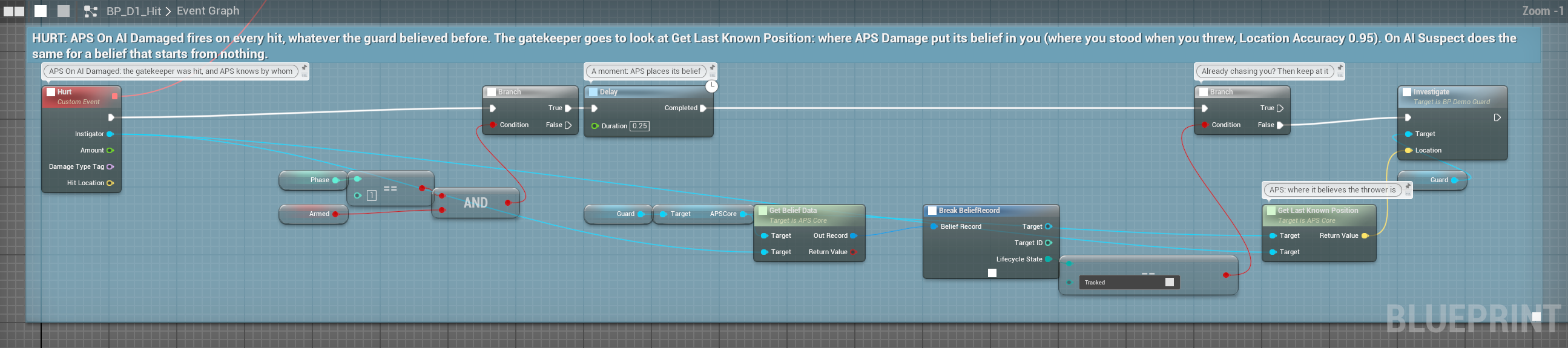
The profile's Auto Confidence from Damage (under Ranges) picks one of two modes:
Auto Confidence from Damage | What a hit does |
|---|---|
| On (the default) | Confidence in the attacker rises to all the damage taken from them so far ÷ 100, never lowered by a hit. The attacker becomes a target at any range, placed where they stood when the hit landed (Location Accuracy 0.95). |
| Off | Only On AI Damaged fires. You decide: Set Target Confidence for "knows exactly who", nothing for a silenced shot. |
Calibrate against your own numbers. With the default thresholds, a rifle doing 25 a shot gives 0.25 after the first hit: Suspected (0.15), not Detected (0.35). After the second, 0.5: Detected. A single 100-damage hit is instant full confidence. A sniper far outside sight and hearing range still becomes a target the moment the shot lands.
Event On AI Damaged (Instigator, Amount, Damage Type Tag, Hit Location)    // Auto Confidence from Damage off
  └─► Branch: Damage Type Tag == Silenced
        True  → Report Pain from Definition (DA_Pain_Bleeding, 0.3)        // hurt, but no idea who
False → Set Target Confidence (Instigator, 0.9) // knows exactly whoThe damage an AI has taken from someone is recorded only in the On mode. With Auto Confidence from Damage off, damage adds nothing to the threat score (Threat Weight Damage Received) and doesn't make the AI afraid or angry, whatever your Set Target Confidence does. Drive those yourself (Set Fear Input, Set Emotion) if you need them.
Losing the attacker: grace 8 s, no direct cut, decay ×0.5 (Damage Loss): an AI remembers being shot. The damage taken also feeds threat: 100 damage fills the damage term. That record fades at Threat Damage Decay Rate (0.05 a second) only while the attacker is Lost, Remembered or Expired; 0 never forgets. See the threat formula.
Pain: senses that stop working#
Pain is not health: it dulls the AI's senses. Flashbang a guard and it is blind for a moment. Set it on fire and it sees and hears worse. Deafen it and it still sees fine.
Setup#
- Add Pain Sense to the profile's
Sense Classes. - Make one Pain Type Definition data asset per kind of pain (Content Browser › Miscellaneous › Data Asset).
- Call Report Pain from Definition (Pain Def, Pain Amount) on the APS Core from your own damage or status code.
There is no list of pain types to register: you pass the asset to the node. Without Pain Sense in the profile the report is ignored, and APS logs a warning once.
A pain type#
| Field | Default | What it does |
|---|---|---|
Display Name, Debug Color | For your own UI: APS doesn't use them | |
Sense Effects | (none) | Pairs of sense → effect (0 to 1). Effect 1 at full pain takes that sense to its floor. A sense not listed is untouched. |
Decay Rate | 0.2 | Level lost per second, in a straight line: a level of 1 at 0.2 a second is gone in 5 s. 0 never fades (clear it yourself). |
Max Level | 1 | The cap: 0.5 never goes past half, however many reports land |
Amount Override | 0 | Above 0, every report adds this instead of the amount you pass: for all-or-nothing pain like a flash |
Each report adds its amount to the level, capped at Max Level. An effect entry also covers Blueprint subclasses of the sense you pick.
How much it dulls#
Each tick, every sense's confidence is multiplied by:
start:          M = Lerp(Floor, 1, Health)                   // full health: 1
each pain type: M = max(M × (1 − Level × Effect), Floor)Floor is the profile's Pain Vision Floor (0) for Vision and its subclasses, and 0 for every other sense. At 0 a fully blinded AI sees nothing at all, right for a flash; 0.2 always leaves it a sliver of sight. Pain types multiply: burning (level 0.5, sight effect 0.4) with smoke (0.8, effect 0.9) leaves sight at 0.8 × 0.28 ≈ ×0.22, not one minus the sum.
When pain drops a sense's contribution below 0.02, APS turns that sense off for the target (blocker: Suppressed By Pain), so the loss timers run: a blinded AI really loses you, rather than holding a frozen sighting.
A useful set#
| Asset | Settings | What it does at a full report |
|---|---|---|
| DA_Pain_Flashbang | Decay 0.5, Amount Override 1; Vision Sense 1, Hearing Sense 0.5 | Blind, hearing halved; both back in a straight line over 2 s |
| DA_Pain_Burning | Decay 0.2; Vision Sense 0.4, Hearing Sense 0.3 | Report 0.6: sight ×0.76, hearing ×0.82, gone 3 s after the last report. Report it while the fire burns. |
| DA_Pain_Bleeding | Decay 0.05, Max Level 0.7; Vision Sense 0.3 | At the cap: sight ×0.79, fading over 14 s |
| DA_Pain_Deafened | Decay 0.3; Hearing Sense 1 | Deaf, back over 3.3 s. Sees fine. |
| DA_Pain_Smoke | Decay 0.5; Vision Sense 0.9, Smell Sense 0.6 | Sight ×0.1, smell ×0.4. Report it each second the AI stands in the smoke. Hearing untouched, so sound still matters. |
To hold a pain at full for a time, keep reporting it: the demo's flash (DA_Pain_Flash: Vision Sense 1, Decay 0.1, Amount Override 1) is reported ten times a second for 7 s, so the sentry is blind for 7 s, then sees again over 10 s.

Pain nodes (on APS Core)#
| Node | What it does |
|---|---|
| Report Pain from Definition (Pain Def, Pain Amount) | Add pain. An amount of 0 or less does nothing. |
| Get Pain Level from Definition (Pain Def) | One type's level, 0 to 1 |
| Get Total Pain Level | The sum of all enabled types, capped at 1: two at 0.6 read 1 |
| Clear Pain from Definition (Pain Def) | Remove one type: a medkit, an extinguisher |
| Clear All Pain | Remove all of it |
| Set Pain Type Enabled from Definition (Pain Def, Enabled) | Immunity: a fire elemental with DA_Pain_Burning disabled. A disabled type ignores reports and stops dulling; its level waits, unfaded, until you enable it again. |
On AI Pain Reported (Pain Def, Pain Level) fires for every report, on the AI's next perception update, with the level just after that report. Several reports between two updates each get their own event (up to 32 waiting).
On AI Pain Reported (Pain Def, Pain Level)
  └─► Branch: Pain Level > 0.7
True → play a stagger montage, Blackboard "Impaired" = trueLow health dulls every sense#
The same formula starts from the AI's health, for every sense: with floor 0, an AI at half health perceives at half strength, and at 10% health at a tenth. A badly wounded guard really is worse at spotting you.
Health is read for you, every tick, when the profile has Pain Sense. APS asks the AI's pawn, in this order:
- the APSHealth Provider interface (its Get APSHealth Fraction answers 1 untouched, 0 dead), on the pawn, then on any of its components;
- a function named GetHealthPercent (a 0 to 100 answer is read as a percentage);
- GetHealth, or else GetCurrentHealth, together with GetMaxHealth.
Only functions with no inputs that return a number count. If your health component has one of these, health already dulls perception with no setup. If you don't want that, implement APSHealth Provider and return 1; or leave Pain Sense out of the profile (which also turns pain off). The interface is on Policies & adapters.
Go deeperSet Health Ratio, Get Health Ratio and Get Pain State
These three are on the Pain Sense object, not on APS Core, and a Blueprint can't reach that object in APS 3.0: they are for C++ (the APS Core's GetSenseInstances). Get Pain State reads Healthy above 0.75, Wounded above 0.40, Critical above 0.15, otherwise Near Death. Set Health Ratio sticks only while nothing answers the health lookup above; when something does, the next tick overwrites it. From Blueprint, give APS health with the APSHealth Provider interface, and read it from your own health component.
Emotions#
Five values on the AI, each 0 to 1: Fear, Aggression, Curiosity, Alertness and Panic. They rise and fall every perception update according to what the AI believes, and the strongest gives the dominant emotion: Calm, Curious, Alert, Aggressive, Fearful or Panicked.
The rules#
"Targets" here are the actors it believes in right now: Suspected, Detected, Tracked, Lost or Remembered. Not places, not things (APS Evidence), and allies count: a guard that sees two squadmates and you has three.
| Emotion | Rises while | Falls while | Otherwise |
|---|---|---|---|
| Fear | It has been hurt by one of its targets (that damage hasn't faded), or it has more than 2 targets, or any target is a Critical threat, or Fear Input is above 0 | It has no targets | Holds |
| Aggression | It has been hurt by one of them, or any target is Tracked, or any is a High or Critical threat | It has no targets | Holds |
| Curiosity | Any target is Suspected (a sound it hasn't seen the source of, a glimpse) | Any target is Tracked or Lost, or it has no targets | Holds |
| Alertness | Any target is Detected or Tracked | Every other time | |
| Panic | Fear is above 0.8 with more than one target, or Fear Input is above 0.9 | Fear is below 0.5 and Fear Input is below 0.3 | Holds |
Rise and fall rates are per second. Fear rises at Fear Rise Rate × (1 + Fear Input): fear input both starts fear and speeds it up. "Hurt by" means damage counted with Auto Confidence from Damage on (see the warning above).
| Emotion | Max | Rise rate | Decay rate |
|---|---|---|---|
| Fear | 1 | 0.5 | 0.2 |
| Aggression | 1 | 0.8 | 0.3 |
| Curiosity | 1 | 0.4 | 0.6 |
| Alertness | 1 | 0.6 | 0.1 |
| Panic | 1 | 0.3 | 0.15 |
All in the profile's Brain › Emotions: Max Fear, Fear Rise Rate, Fear Decay Rate and so on for each. A Max of 0 turns that emotion off: set all five to 0 and a robot feels nothing, with no code.
The dominant emotion: Panicked while Panic is above Panic Override Threshold (0.75). Otherwise the highest of Fear, Aggression, Curiosity and Alertness that is above Emotion Active Threshold (0.2); a tie goes in that order (Fear first). Calm when none is.
Emotion nodes (on APS Core)#
| Node | What it does |
|---|---|
| Get Emotional State | All five values, the Dominant Emotion and the Fear Input |
| Get Dominant Emotion | Calm, Curious, Alert, Aggressive, Fearful or Panicked |
| Set Fear Input (Value) | An outside source of fear, 0 to 1, that stays until you change it: a horror event, a boss's roar. 0 lets fear fade by the rules. |
| Set Emotion (Emotion, Value) | Set one value once. The rules carry on from there the next update: for a lasting fear use Set Fear Input. |
| Reset Emotional State | Everything to 0 (fear input too), Calm |
On Emotional State Changed (Old Dominant, New Dominant) fires when the dominant emotion changes. It's on APS Core only, not on the APS Perception Listener.

Emotions don't change what the AI perceives: they are a reading for your behaviour. Typical uses:
On Emotional State Changed (Old Dominant, New Dominant)
  └─► Switch on New Dominant
        ├─ Panicked   → flee, drop the weapon
        ├─ Fearful    → Blackboard "Retreat" = true
        ├─ Aggressive → push the attack
        ├─ Curious    → investigate
└─ Calm → back to patrolOne intruder at a time#
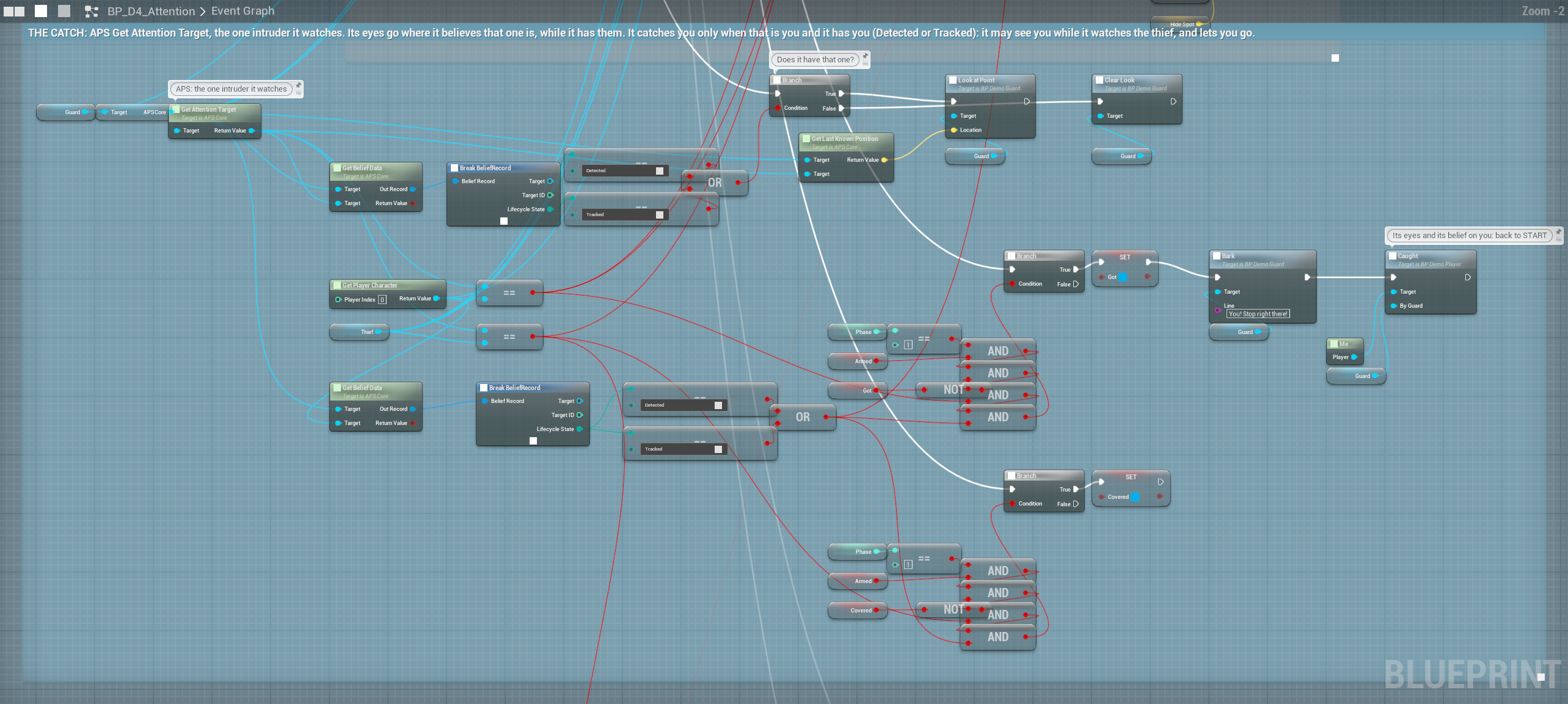
An AI that perceives several targets still commits to one: Get Attention Target. Attention is sticky (Attention Stickiness Time, Attention Switch Threshold), so it doesn't flick between two equal targets. The demo's D4 warden looks only at its attention target, and it catches you only when that is you and it has you (Detected or Tracked): walk while its eyes are on the thief. Check the state like this whenever you use attention: the attention target can be one the AI only suspects. How attention picks and switches is on How APS thinks.
Putting it together#
Damage says who did it; pain says what it did to me:
Event On AI Damaged (Instigator, Amount, Damage Type Tag, Hit Location)
  └─► Switch on Name (Damage Type Tag)
        ├─ Fire      → Report Pain from Definition (DA_Pain_Burning, 0.6)
        ├─ Explosive → Report Pain from Definition (DA_Pain_Deafened, 1)
└─ Default → Report Pain from Definition (DA_Pain_Bleeding, Amount / 200)Your health component lowers its health as usual; through the health lookup APS dulls every sense to match. With Damage Sense on, the AI already believes in the attacker, and its fear and aggression are rising.
APS and Unreal's AI Perception#
| Unreal AI Perception | APS | |
|---|---|---|
| Damage | Damage events you report yourself (Report Damage Event) | Every Unreal damage call, no setup: who did it, at any range, placed where they stood; feeds threat and emotion |
| Impairment | None | Pain types that dull chosen senses and fade; low health dulls every sense |
| Emotion | None | Five emotions with rules and rates, a dominant emotion and an event |
| Focus | None built in | One attention target, sticky |