
World & fairness#
Your level's light, weather and wind change what an AI perceives, and places can have their own conditions. Then four fairness rules make every detection something the player can see coming.
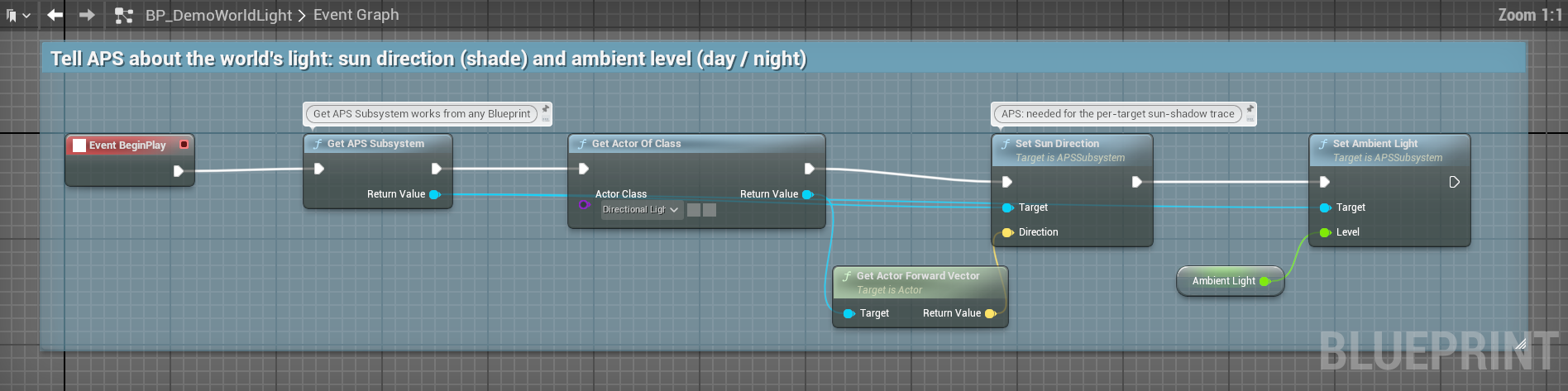
- Call Set Sun Direction and Set Ambient Light once on the APS Subsystem: shadow and night now hide the player.
- Put an APS Environment component on anything to make a place with its own light, rain, wind or sense ranges: fog, smoke, a cellar, a market.
- Fairness: a beat to step back out of view (
First Spot Reaction Time), a "huh?" before it commits (On AI Telegraph), and safe rooms.
The world's conditions#
One set of conditions for the whole world lives on the APS Subsystem. Get it with Get APS Subsystem from any Blueprint.
| Node | What it does |
|---|---|
| Set Ambient Light (Level) | Light everywhere, 0 dark to 1 daylight (1 at start). Drive it from your day and night. |
| Set Sun Direction (Direction) | Your directional light's forward vector. Needed for shadow (below). |
| Set Weather Modifier (Mod) | 1 clear (the start) to 0: sight, hearing and smell are all multiplied by it |
| Set Wind State (Direction, Speed) | Which way the wind blows and how hard, in cm/s: scent travels with it (Smell) |
| Set Indoors (Indoors) | Indoors, scent concentrates (×1.2) and the wind is ignored |
| Set Time Of Day (Hour) | 0 to 24. APS itself doesn't use it: it's for your logic and the APS Visualizer |
| Set Environment State (New State), Get Environment State | All of it at once |
| Condition | What it does to the AI |
|---|---|
| Darkness | Sight × Lerp(Darkness Min Detection, 1, light): at light 0 it sees at Darkness Min Detection (0.1) strength |
| Weather | Sight, hearing and smell × the weather modifier: at 0 all three are silenced |
| Wind | Outdoors, smell weakens as the wind rises: × 0.25 at 800 cm/s and above. Downwind of you it smells you up to twice as strongly (Smell). |
| Indoors | Smell × 1.2, and no wind |
Your weather actor, when the weather changes:
  Get APS Subsystem
    ├─► Set Ambient Light    (0.2 at night, 1 at noon)
    ├─► Set Weather Modifier (1 clear, 0.4 in heavy rain)
    ├─► Set Wind State       (wind direction, wind speed)
└─► Set Sun Direction (your Directional Light → Get Actor Forward Vector)A storm now makes guards worse at seeing and hearing you, with no AI code at all.
Light#
Global light models day and night, not the dark corner of a lit room. For that, tick Use Per Target Light on the profile: APS then traces from the target toward the sun, and a target in shadow gets Shadow Light Level (0.25). Shadow only darkens: the result is the lower of the two.
How lit a target is, first match wins:
- its APS Target Component's
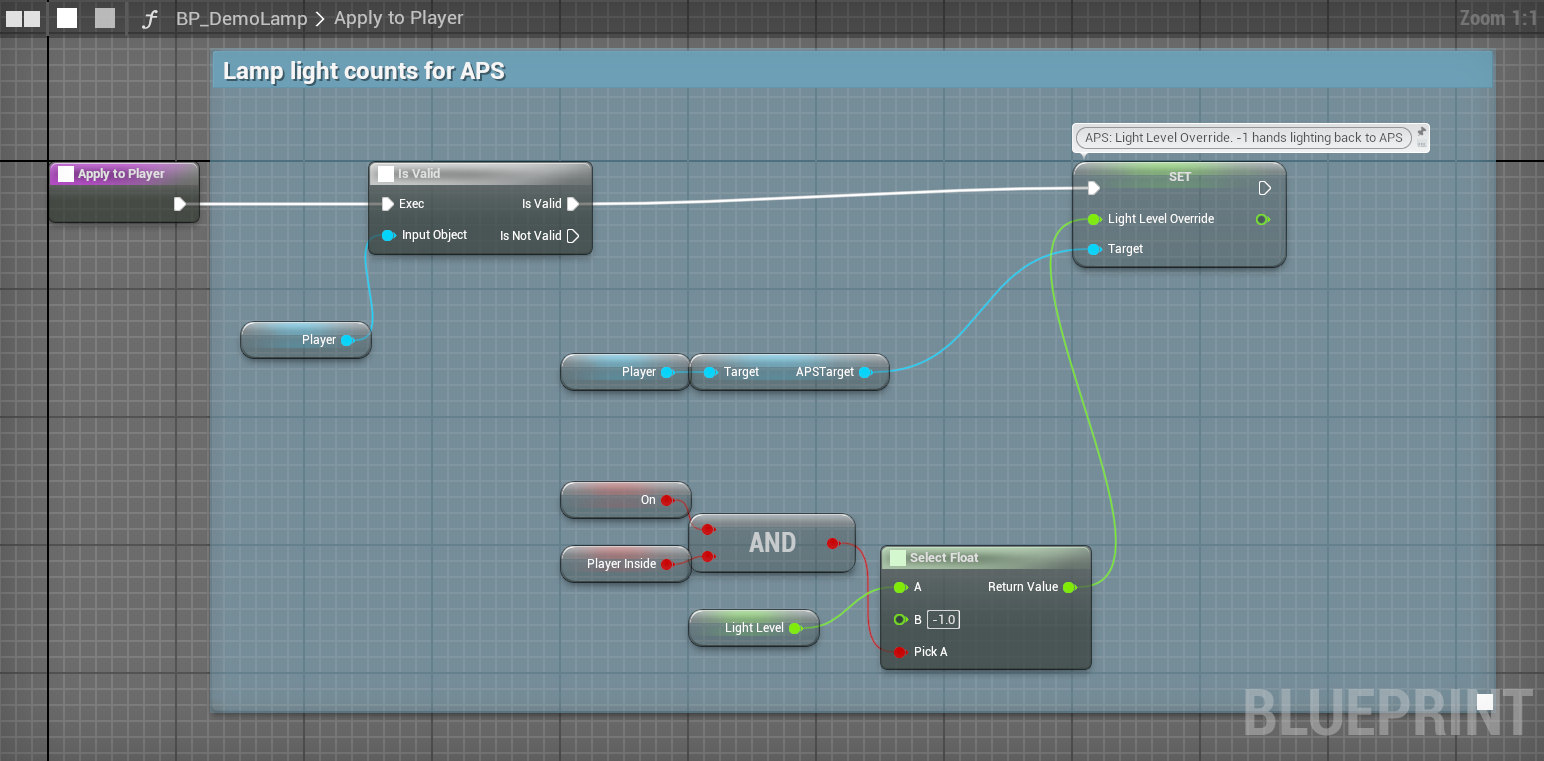
Light Level Override, when it is 0 or more. This wins whatever the profile says: drive it from your own light gem. - With
Use Per Target Lightoff, the global light. - A Quality Profile with
Skip Per Target Lighton (to save traces): the global light. Trace Sun Shadow(on by default) and Set Sun Direction called: the shadow trace, up toSun Trace Distance(5000) toward the sun.- Otherwise the global light.
Places with their own conditions#
A smoke grenade, a fog bank, a dark cellar, a noisy market: add an APS Environment component to any actor and it becomes a sphere (around the actor, moving with it) where conditions change. Each change is opt-in, so a market that dulls hearing doesn't also turn dark.
| Setting | Default | What it does |
|---|---|---|
Radius | 1000 | Size of the sphere, in cm |
Priority | 0 | Where spheres overlap, the higher wins; on a tie, the one whose centre is nearer |
Override Light, Light Level | off, 1 | Its own light |
Override Rain, Rain Intensity | off, 0 | Its own weather: 0.6 rain is a weather modifier of 0.4 |
Override Wind, Wind Direction, Wind Speed | off | Its own wind |
Override Indoors, Is Indoors | off | Indoors or out |
Vision Range Scale | 1 | Sight reaches this share as far (0.3 is thick fog) |
Hearing Range Scale | 1 | Hearing: below 1 a crowded market, above 1 a room that carries sound |
Smell Range Scale | 1 | Smell |
Where it is measured:
- Sight range at the target: smoke around what you look at hides it; smoke around you mostly doesn't.
- Hearing and smell range at the AI: a guard in a noisy market hears less, wherever the noise comes from.
- Light, rain, wind and indoors at the AI: a guard standing in a dark cellar sees less well. A player in that cellar, seen from outside, is lit by the global light (or the shadow trace, or the Light Level Override).
Where spheres overlap, only the winning sphere applies; the others' changes are not combined. A smoke cloud inside a dark warehouse that changes only Vision Range Scale takes over inside the cloud, and there the warehouse's darkness is gone. Give the inner sphere every change it should keep (the same Override Light here).
Get Environment At (Location) and Get Sense Range Scale At (Location, Sense ID: Vision, Hearing or Smell) on the APS Subsystem tell you the conditions at any point.
Who can be perceived#
Pawns are found by themselves; anything else (a dropped weapon, a turret) needs Register Perceivable Actor or an APS Target Component. The rules are on How APS thinks.
Fairness#
None of these exist in Unreal's AI Perception, and every stealth game needs them. They make the AI weaker on paper and far better to play against, because the player can always tell what gave them away.
| Setting (profile, Fairness) | Default | What it does |
|---|---|---|
First Spot Reaction Time | 0 | Seconds it must see a target it doesn't know yet before believing its eyes |
Telegraph Threshold | 0.25 | On AI Telegraph fires as confidence crosses this, before it commits |
Offscreen Hearing Penalty | Off | AI off the player's screen hear worse |
Offscreen Hearing Multiplier | 0.75 | How much worse |
Respect Never Search Zones | On | Whether this AI's safe-room query answers (below) |
A beat to step back#
First Spot Reaction Time: while an AI doesn't know a target yet, its senses must hold that target for this long before confidence starts to count at all. It's a reaction time: blunder into the open, step straight back, and you're not seen.
- 0: instant, machine-like. Right for cameras and turrets.
- 0.3: sharp but human.
- 0.5: forgiving: a first level, an easy mode.
- 1: very generous: an accessibility option.
It applies until the AI first suspects that target. After that, seeing it again is instant for as long as the AI remembers it; the reaction time comes back only once its belief has expired and the slot is reused. Losing contact for longer than 0.5 s (or 4 × Base Update Interval, if that is longer) before the time is up starts it again; a sense skipping an update doesn't.
A warning before it commits#
On AI Telegraph (Target, Confidence) fires once when its confidence in a target reaches Telegraph Threshold. It fires again only after it has let that target go completely (Undetected or Expired), and never for a thing (APS Evidence). Put the bark, the head turn or the meter flicker here: "it spotted me out of nowhere" becomes "I saw it notice me and I chose wrong".
On AI Telegraph (Target, Confidence)
  ├─► play a "Hm?" bark
  ├─► Set Focal Point (Target)        // the head turns toward you
└─► flash the detection pip on the HUDKeep Telegraph Threshold between Suspect Threshold (0.15) and Detect Threshold (0.35), so the warning comes before the AI acts. The profile's Validate Profile button warns in the Output Log when it isn't.
Quieter when off-screen#
With Offscreen Hearing Penalty on, an AI off the player's screen hears at Offscreen Hearing Multiplier strength: an AI the player has never seen reacting to a noise the player never saw it hear reads as cheating.
"Off-screen" is a cheap test against player 0's camera: more than about 75° from where it points. It ignores distance, walls and the screen's shape, and only asks the first local player; with no camera (a dedicated server) nothing counts as off-screen. Fine for softening hearing, not a real "is this visible" test.
Safe rooms#
A place the AI never searches, so the tension can release: Register Never Search Zone (Center, Radius) on the APS Subsystem; Unregister Never Search Zone (Center, Tolerance) removes the nearest one within the tolerance; Clear Never Search Zones removes all.
APS doesn't enforce them by itself: perception still works inside, and APS Search still hands out points there. Your search logic asks Is Location in Never Search Zone (Location) on the APS Core before sending the AI anywhere (it answers false for an AI whose profile has Respect Never Search Zones off); Is in Never Search Zone on the subsystem asks for every zone regardless. The demo's M4 room shows it: Search & evidence.
A fair stealth guard#
| Setting | Value | Why |
|---|---|---|
First Spot Reaction Time | 0.4 | A beat to duck back |
Telegraph Threshold | 0.22 | You hear "hm?" before you're caught |
Suspect Threshold | 0.18 | It starts to investigate |
Detect Threshold | 0.40 | Full alert |
Eye Turn Rate Deg Per Sec | 180 | It can't see you before it has turned |
Offscreen Hearing Penalty | On | Unseen AI don't act on unseen noises |
Keyhole Vision | On | Distance protects you, being close doesn't (Vision) |
APS and Unreal's AI Perception#
| Unreal AI Perception | APS | |
|---|---|---|
| Light and shadow | None: you're as visible in the dark | Global light, per-target shadow, your own light gem |
| Weather, wind | None | Rain dulls sight, hearing and smell; wind carries scent |
| Places | None | Spheres with their own light, weather and sense ranges |
| Fairness | None | Reaction time, a warning event, off-screen hearing, safe rooms |